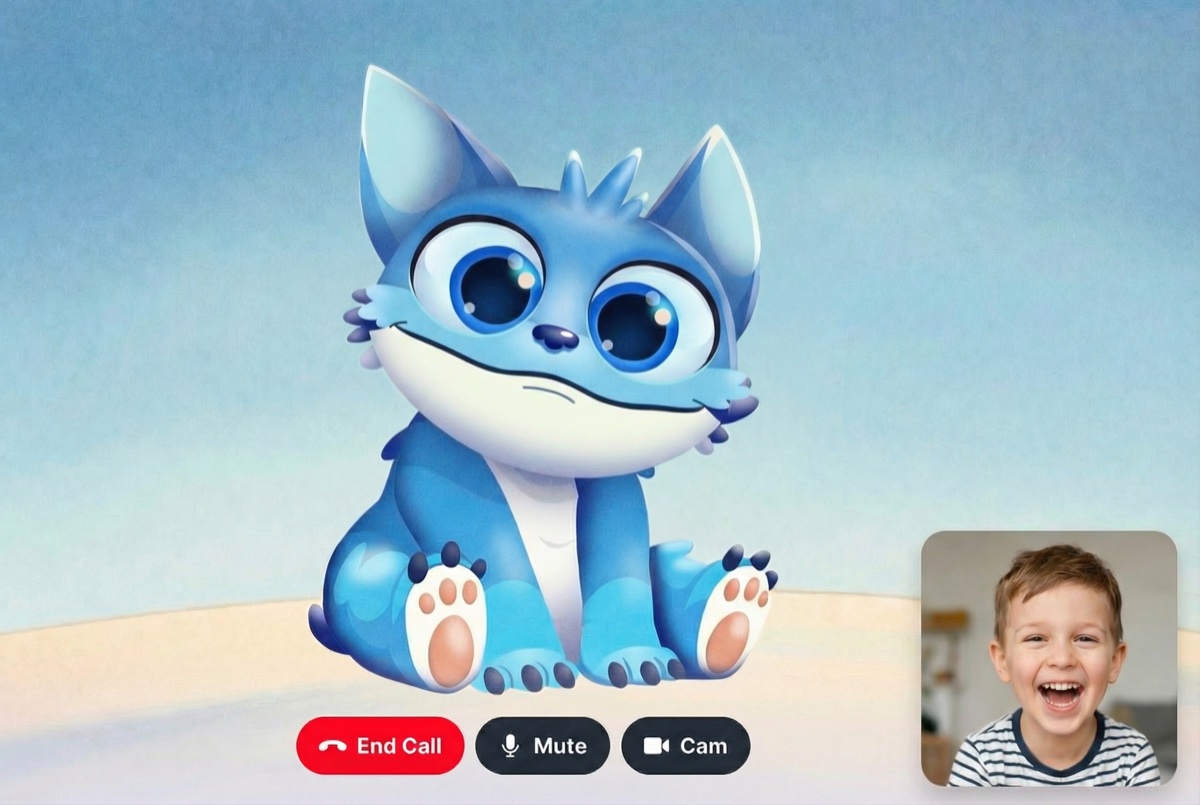
> ## Documentation Index
> Fetch the complete documentation index at: https://docs.mascot.bot/llms.txt
> Use this file to discover all available pages before exploring further.
# Gemini Live API Avatar Integration - Build Interactive AI Avatars with Lip Sync
> Complete guide to building interactive AI avatars with Gemini Live API and Mascot Bot SDK. Real-time lip sync, ephemeral tokens, WebSocket streaming, and production-ready React components. TypeScript/JavaScript tutorial →
# Gemini Live API Avatar — Build an Interactive AI Avatar with Real-time Lip Sync
Add a **lip-synced animated avatar** to your Gemini Live API application in minutes. Mascot Bot SDK works alongside the official Google AI SDK (`@google/genai`) — your existing Gemini code stays untouched. The SDK plays Gemini's audio output and animates a real-time avatar from it.
Add avatars in 5 minutes
See Gemini Live avatar in action
Complete example code
Real-time lip sync & more
Complete hook documentation
One-click deployment
## Why Add an Avatar to Your Gemini Live API App?
Voice-only Gemini feels disembodied. A **lip-synced avatar** makes the assistant feel present. The Mascot Bot SDK adds that without changing how you use Gemini Live: you keep `@google/genai`, and the SDK lip-syncs Gemini's audio output in real time.
### How It Works: Real-Time Lip Sync
Gemini Live streams the assistant's voice as raw base64 PCM16 (it does **not** play the audio for you). The pattern:
1. Your server mints a short-lived **ephemeral token** so the standing Gemini key never reaches the browser.
2. The browser connects to Gemini Live with `@google/genai` using that token.
3. [`createPCMStreamPlayer`](/core/pcm-stream-player) plays Gemini's PCM gap-tolerantly and exposes it as a `MediaStream`.
4. `useLipsyncStream` taps that stream; the SDK infers visemes and drives the avatar.
No Mascot Bot endpoint sits in the audio path. See [Realtime overview](/realtime/overview) for the provider-agnostic version.
## Features
### Real-time Lip Sync for Gemini Live API
Real-time viseme inference from Gemini's audio output — no server round-trip for visemes, no perceptible lag.
### 120fps Avatar Animation
WebGL2 + Rive runtime for smooth, natural facial motion.
### Native Google AI SDK Compatibility
Use `@google/genai` exactly as documented by Google. The SDK never proxies or wraps the Gemini connection — it only plays and taps the audio.
### Ephemeral Token Security
Mint single-use ephemeral tokens server-side with `ai.authTokens.create(...)`. The standing Gemini API key never reaches the client.
### Streaming Avatar Audio
`createPCMStreamPlayer` plays Gemini's PCM gap-tolerantly and exposes a parallel `MediaStream` tap so the avatar stays locked to what is heard.
### Natural Lip Sync Processing
Optional viseme post-processing for natural, non-robotic motion — [Natural lip sync](/libraries/natural-lip-sync).
### Webcam Video Streaming
Gemini Live can accept webcam frames (`session.sendRealtimeInput({ video })`). That is a Gemini capability you use directly through `@google/genai` — it is independent of lip sync and the SDK does not gate it.
### Session Management
Gemini Live sessions are time-limited. Re-mint a token and reconnect when a session ends; the SDK's `player.stop()` handles barge-in/interruption.
## Quick Start
### Installation
```ini .npmrc theme={null}
@mascotbot:registry=https://npm.mascot.bot/
//npm.mascot.bot/:_authToken=mascot_xxx
```
```bash theme={null}
pnpm add @mascotbot/react @rive-app/react-webgl2 @rive-app/webgl2 @google/genai
```
Get your Mascot Bot key at [app.mascot.bot/api-keys](https://app.mascot.bot/api-keys). Full registry/key setup: [Installation](/installation). `@google/genai` is Google's official SDK, used unchanged.
### Basic Integration
```tsx theme={null}
"use client";
import { MascotProvider } from "@mascotbot/react";
import { Mascot, MascotRive } from "@mascotbot/react/rive";
export default function App() {
return (
);
}
```
`GeminiAvatar` is built in [Step 2](#step-2-create-your-avatar-component).
## Complete Implementation Guide
### Step 1: Set Up Ephemeral Token Generation (Server-Side)
Mint a single-use ephemeral token so the standing `GEMINI_API_KEY` stays on the server.
```typescript theme={null}
// app/api/gemini/token/route.ts
export const runtime = "nodejs";
export async function POST() {
const key = process.env.GEMINI_API_KEY;
if (!key) return Response.json({ error: "GEMINI_API_KEY not set" }, { status: 400 });
const model = "models/gemini-3.1-flash-live-preview";
const { GoogleGenAI, Modality } = await import("@google/genai");
const ai = new GoogleGenAI({ apiKey: key, httpOptions: { apiVersion: "v1alpha" } });
const token = await ai.authTokens.create({
config: {
uses: 1,
newSessionExpireTime: new Date(Date.now() + 10 * 60 * 1000).toISOString(),
liveConnectConstraints: {
model,
config: { responseModalities: [Modality.AUDIO] },
},
},
});
return Response.json({ ephemeralToken: token.name, model });
}
```
### Step 2: Create Your Avatar Component
Gemini Live does not play audio — `createPCMStreamPlayer` plays it and exposes the tap. The microphone is sent to Gemini via `session.sendRealtimeInput`.
```tsx theme={null}
"use client";
import { useEffect, useRef, useState } from "react";
import { useMascot, createPCMStreamPlayer, type PCMStreamPlayer } from "@mascotbot/react";
import { useMascotPlayback, useLipsyncStream } from "@mascotbot/react/rive";
const LIP_SYNC = { minVisemeInterval: 60, mergeWindow: 80 } as const;
export function GeminiAvatar() {
const { client, status } = useMascot();
const playback = useMascotPlayback({ stream: true, enableNaturalLipSync: true, naturalLipSyncConfig: LIP_SYNC });
const playerRef = useRef(null);
const [stream, setStream] = useState(null);
const teardownRef = useRef void)>(null);
const { error, attached } = useLipsyncStream({ client, playback, source: { kind: "mediaStream", stream } });
useEffect(() => () => { teardownRef.current?.(); void playerRef.current?.close(); }, []);
const connect = async () => {
if (status !== "ready") return;
// Create the player inside the click, before any await.
const player = createPCMStreamPlayer({ sampleRate: 24000 });
playerRef.current = player;
setStream(player.outputStream);
const { ephemeralToken, model } = await (await fetch("/api/gemini/token", { method: "POST" })).json();
const { GoogleGenAI, Modality } = await import("@google/genai");
const ai = new GoogleGenAI({ apiKey: ephemeralToken, httpOptions: { apiVersion: "v1alpha" } });
// Liveness flag: the mic processor fires continuously — never send to a closed socket.
let live = true;
const session = await ai.live.connect({
model, // "models/gemini-3.1-flash-live-preview"
config: { responseModalities: [Modality.AUDIO] },
callbacks: {
onmessage: (msg: any) => {
const b64 = msg?.serverContent?.modelTurn?.parts?.[0]?.inlineData?.data;
if (typeof b64 === "string") player.pushBase64PCM16(b64);
if (msg?.serverContent?.interrupted) player.stop();
},
onerror: () => { live = false; },
onclose: () => { live = false; },
},
});
// Mic: 16 kHz mono → PCM16 → sendRealtimeInput
const mic = await navigator.mediaDevices.getUserMedia({ audio: { channelCount: 1, sampleRate: 16000 } });
const Ctor = (window as any).AudioContext || (window as any).webkitAudioContext;
const ctx = new Ctor({ sampleRate: 16000 });
const src = ctx.createMediaStreamSource(mic);
const proc = ctx.createScriptProcessor(4096, 1, 1);
proc.onaudioprocess = (ev: AudioProcessingEvent) => {
if (!live) return;
const f32 = ev.inputBuffer.getChannelData(0);
const pcm = new Int16Array(f32.length);
for (let i = 0; i < f32.length; i++) {
const s = Math.max(-1, Math.min(1, f32[i]));
pcm[i] = s < 0 ? s * 0x8000 : s * 0x7fff;
}
let bin = "";
const bytes = new Uint8Array(pcm.buffer);
for (let i = 0; i < bytes.length; i++) bin += String.fromCharCode(bytes[i]);
try {
session.sendRealtimeInput({ audio: { data: btoa(bin), mimeType: "audio/pcm;rate=16000" } });
} catch { live = false; }
};
src.connect(proc);
proc.connect(ctx.destination);
session.sendClientContent({ turns: "Say a short friendly hello.", turnComplete: true });
teardownRef.current = () => {
live = false;
proc.onaudioprocess = null;
proc.disconnect(); src.disconnect();
mic.getTracks().forEach((t) => t.stop());
void ctx.close();
session.close();
};
};
return (
);
}
```
### Step 3: Advanced Features
* **Natural lip sync** — pass a stable `naturalLipSyncConfig`; full reference and presets in [Natural lip sync](/libraries/natural-lip-sync).
* **Barge-in** — `player.stop()` on `serverContent.interrupted` (shown above) drops queued audio instantly.
* **Webcam video** — send frames to Gemini via `session.sendRealtimeInput({ video: … })`. This is a Gemini Live feature, used directly through `@google/genai`; it does not involve the lip sync SDK.
* **Custom Rive inputs** — the SDK only writes the mouth. Drive gestures/outfits yourself; detect them with `useMascotInputs().has(name)` ([Rive co-existence](/concepts/rive-coexistence)).
## API Reference
The integration uses the standard SDK surface plus Google's official SDK:
| Surface | Role |
| --------------------------------------------------------------- | -------------------------------------------------------------------------------- |
| `` | Licensed avatar client. [Config](/installation#4-configure-the-client). |
| `` / `` / `` | Load and render the avatar. |
| `useMascotPlayback({ stream: true, enableNaturalLipSync })` | Mouth playback engine. |
| `createPCMStreamPlayer({ sampleRate: 24000 })` | Plays Gemini PCM + exposes the tap. [Reference](/core/pcm-stream-player). |
| `useLipsyncStream({ source: { kind: "mediaStream", stream } })` | Lip-syncs the tapped audio. [Reference](/libraries/streaming-and-mic). |
| `@google/genai` `ai.live.connect` / `ai.authTokens.create` | Google's official SDK — unchanged. Model `models/gemini-3.1-flash-live-preview`. |
## Gemini Live API Pricing & Free Tier
Gemini Live API usage is billed by Google per their pricing; the ephemeral-token model adds no Mascot Bot cost. Mascot Bot meters by your plan's speech/MAU allowance — replaying a persisted [timeline](/libraries/offline-lipsync) does not re-meter. Check current Gemini pricing in the Google AI documentation.
## Use Cases
### AI Customer Service Avatar
A visible assistant for support — visual presence during Gemini voice conversations.
### Educational AI Tutor
Pair with the `educational` natural-lip-sync preset for crisp articulation in language/learning apps.
### Voice AI Virtual Receptionist
A branded, welcoming front desk powered by Gemini Live.
### AI Mascot for Streaming & Content
A reactive on-screen character; drive non-mouth animation yourself via raw Rive inputs.
## Troubleshooting
### Avatar Not Moving?
Confirm `status === "ready"`, that `player.outputStream` is set as the `mediaStream` source, and that the Rive file uses artboard `Character` + state machine `mascotStateMachine` with inputs `100`–`118`.
### Only First Second of Speech Animated?
A non-stable `naturalLipSyncConfig` reinitializes playback. Use a module constant — [Troubleshooting](/libraries/react-troubleshooting).
### Connection Fails on Second Call?
Ephemeral tokens are single-use (`uses: 1`). Mint a fresh token per session/reconnect.
### No Audio Playing?
`createPCMStreamPlayer` must be created inside the user-gesture click before any `await`, or its `AudioContext` starts suspended. Also confirm you are calling `player.pushBase64PCM16` on `modelTurn` audio parts.
### Session Disconnects After \~10 Minutes?
Gemini Live sessions are time-limited. Detect `onclose`, mint a new token, and reconnect.
## FAQ
### How Does Mascot Bot Work with the Google AI SDK?
It runs alongside it. You use `@google/genai` as documented; the SDK plays Gemini's PCM and lip-syncs it in real time.
### Does It Work With My Existing Gemini Code?
Yes. Use `@google/genai` exactly as documented; the SDK turns Gemini's audio output into a real-time avatar.
### Do I Modify My Gemini Code?
No. Add a PCM player + a `useLipsyncStream` tap; the Gemini connection is unchanged.
### Can I Use My Own Ephemeral Token Setup?
Yes. Any server route returning a valid `ai.authTokens.create` token name works.
### What Gemini Models Support the Live API?
Use a Live-API model such as `models/gemini-3.1-flash-live-preview` with `apiVersion: "v1alpha"`.
### Is Audio Sent to Mascot Bot?
Your users' speech is processed by the SDK in their browser and isn't sent to or stored on Mascotbot servers.
### Is This an Open-Source Alternative to Pre-rendered Interactive Avatars?
Yes — a real-time alternative to server-rendered talking-head services.
## Start Building with Gemini Live API Avatar
See it in action
Complete working example
## Next Steps
1. Get a key at [app.mascot.bot/api-keys](https://app.mascot.bot/api-keys) and install from the [private registry](/installation).
2. Add the server token route and the avatar component above.
3. Tune motion with [natural lip sync](/libraries/natural-lip-sync).
4. Review the [realtime overview](/realtime/overview) and [PCM stream player](/core/pcm-stream-player) for the underlying pattern.