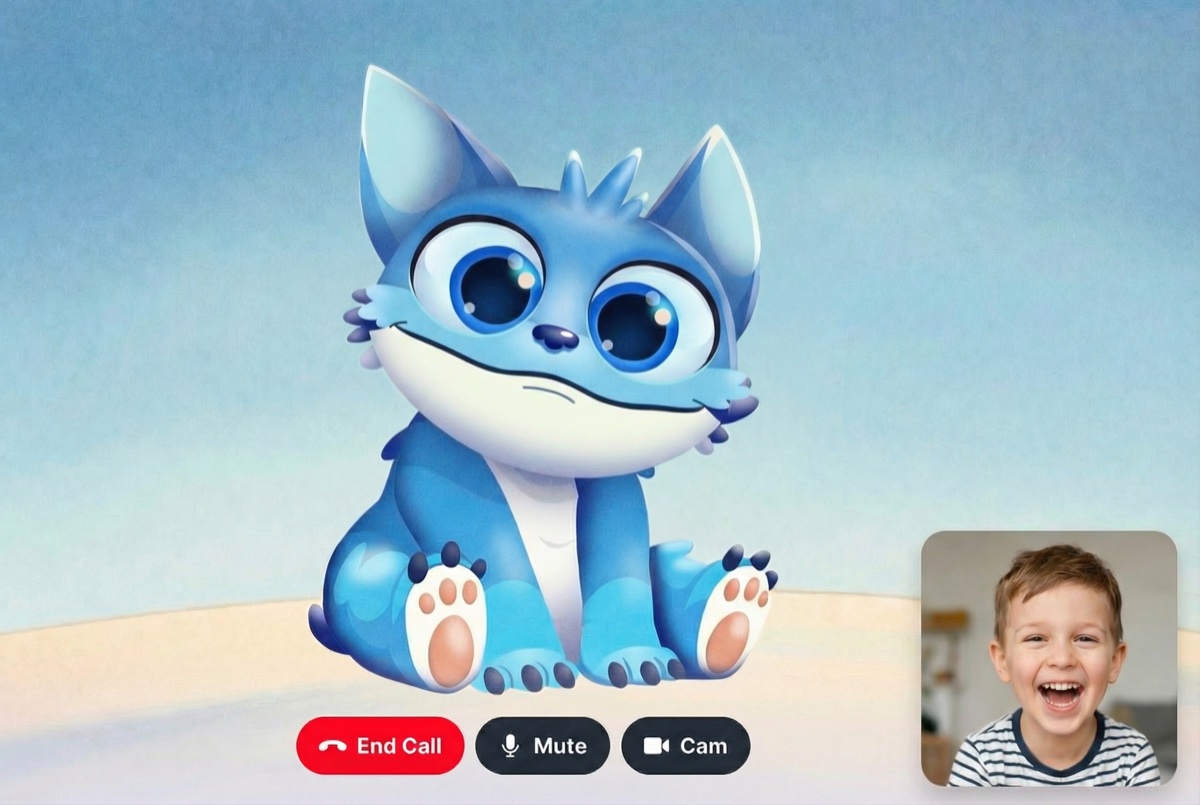
Gemini Live API Avatar Integration - Build Interactive AI Avatars with Lip Sync
Complete guide to building interactive AI avatars with Gemini Live API and Mascot Bot SDK. Real-time lip sync, ephemeral tokens, WebSocket streaming, and production-ready React components. TypeScript/JavaScript tutorial →
Gemini Live API Avatar — Build an Interactive AI Avatar with Real-time Lip Sync
Add a lip-synced animated avatar to your Gemini Live API application in minutes. Mascot Bot SDK works alongside the official Google AI SDK (@google/genai) — your existing Gemini code stays untouched. Just swap the base URL and you get automatic viseme injection, real-time lip sync, and production-ready React components.
The Gemini Live API delivers real-time, multimodal voice conversations over WebSocket — but voice alone can feel impersonal. By pairing it with an interactive AI avatar that speaks with perfectly synchronized lip movements, you transform a voice stream into an engaging visual experience.Mascot Bot SDK is designed to complement the Google AI SDK, not replace it. You continue to use @google/genai for connecting, sending audio, and handling responses exactly as you normally would. Mascot Bot simply intercepts the WebSocket stream, extracts audio timing data, and drives a Rive-powered avatar with frame-accurate lip sync — all without modifying a single line of your Google SDK code.
The integration is elegantly simple. Google AI SDK natively supports a baseUrl option in httpOptions. Mascot Bot uses this as the integration point:
Copy
// Without Mascot Bot — direct to Googleconst ai = new GoogleGenAI({ apiKey: "your-google-api-key",});// With Mascot Bot — just swap the base URLconst ai = new GoogleGenAI({ apiKey: mascotBotToken, // Mascot Bot token (wraps your Google credentials) httpOptions: { baseUrl: "https://api.mascot.bot", // Mascot Bot proxy },});// Everything else stays exactly the same!const session = await ai.live.connect({ model: "gemini-2.5-flash-preview" });
The Mascot Bot proxy transparently forwards all Gemini traffic while injecting viseme data into the response stream. Your Google SDK calls — session.sendRealtimeInput(), session.sendClientContent(), session.close() — all work identically.
Frame-accurate viseme synchronization with Gemini audio responses. Audio and visemes arrive in a single combined WebSocket message, ensuring zero drift between voice and mouth animation.
Works alongside @google/genai with zero conflicts. Your existing Gemini Live API code stays untouched — Mascot Bot integrates through the SDK’s native baseUrl option.
Full support for Google’s ephemeral token system. Lock system instructions, voice config, and model parameters server-side. The client never sees your API key or prompt.
Stream your webcam video to Gemini so the AI can see you while you talk. Gemini’s multimodal capabilities let the avatar respond to what it sees — making conversations more natural and context-aware.
You’ll receive the SDK .tgz file after subscribing to one of our plans. The SDK works alongside the official Google AI SDK (@google/genai) without any modifications. Both packages are required for the integration.
Want to see a complete working example? Check out our open-source demo repository with full implementation, or deploy it directly to Vercel with one click.
Step 1: Set Up Ephemeral Token Generation (Server-Side)
Gemini Live API supports ephemeral tokens that lock configuration server-side. This is the recommended approach for production — the client never sees your API key, system instructions, or voice settings.Mascot Bot fully supports this pattern. You create a Google ephemeral token, pass it to the Mascot Bot proxy, and receive a wrapped token the client can safely use.
The Mascot Bot proxy endpoint receives your Google ephemeral token and creates a proxied connection that injects real-time viseme data into the Gemini WebSocket stream. This is required for avatar lip sync to work.
Copy
// app/api/get-signed-url-gemini/route.tsimport { NextResponse } from 'next/server';import { GoogleGenAI, Modality } from '@google/genai';// Configuration locked server-side — client never sees thisconst GEMINI_CONFIG = { model: 'gemini-2.5-flash-preview', systemInstruction: 'You are a friendly assistant. Keep responses brief and conversational.', voiceName: 'Aoede', // Google's built-in voice thinkingBudget: 0, // Disable thinking for faster responses initialMessage: 'Hello',};export async function GET() { try { const geminiApiKey = process.env.GEMINI_API_KEY; if (!geminiApiKey) { return NextResponse.json( { error: 'Gemini API key not configured' }, { status: 500 } ); } // 1. Create Google ephemeral token with locked config const ai = new GoogleGenAI({ apiKey: geminiApiKey, httpOptions: { apiVersion: 'v1alpha' }, }); const googleToken = await ai.authTokens.create({ config: { uses: 1, // Single-use token liveConnectConstraints: { model: GEMINI_CONFIG.model, config: { responseModalities: [Modality.AUDIO], systemInstruction: { parts: [{ text: GEMINI_CONFIG.systemInstruction }], }, speechConfig: { voiceConfig: { prebuiltVoiceConfig: { voiceName: GEMINI_CONFIG.voiceName }, }, }, generationConfig: { thinkingConfig: { thinkingBudget: GEMINI_CONFIG.thinkingBudget }, }, }, }, httpOptions: { apiVersion: 'v1alpha' }, }, }); // 2. Get Mascot Bot proxy token const response = await fetch('https://api.mascot.bot/v1/get-signed-url', { method: 'POST', headers: { Authorization: `Bearer ${process.env.MASCOT_BOT_API_KEY}`, 'Content-Type': 'application/json', }, body: JSON.stringify({ config: { provider: 'gemini', provider_config: { ephemeral_token: googleToken.name, model: GEMINI_CONFIG.model, }, }, }), cache: 'no-store', }); if (!response.ok) { throw new Error('Failed to get signed URL'); } const data = await response.json(); // 3. Return connection info (config is NOT exposed) return NextResponse.json({ baseUrl: 'https://api.mascot.bot', ephemeralToken: data.api_key, model: GEMINI_CONFIG.model, initialMessage: GEMINI_CONFIG.initialMessage, }); } catch (error) { console.error('Error:', error); return NextResponse.json( { error: 'Failed to generate signed URL' }, { status: 500 } ); }}export const dynamic = 'force-dynamic';
Ephemeral tokens are single-use (uses: 1). After a call ends, the cached token is consumed. Always invalidate the cache on disconnect and fetch a fresh token for the next call.
Copy
// In your onclose / onerror callbacks:onclose: () => { setSessionStatus('disconnected'); setCachedConfig(null); // Invalidate consumed token fetchConfig(); // Pre-fetch fresh token for next call},
Create more realistic mouth movements by adjusting natural lip sync parameters:
Start with the “conversation” preset for most use cases. Adjust parameters based on your specific needs — higher minVisemeInterval for smoother movements, lower for more articulation.
Copy
import { useMemo } from 'react';// Different presets for various use casesconst lipSyncPresets = { // Natural conversation — best for most Gemini Live API voice AI conversation: { minVisemeInterval: 40, mergeWindow: 60, keyVisemePreference: 0.6, preserveSilence: true, similarityThreshold: 0.4, preserveCriticalVisemes: true, }, // Fast speech — for excited or rapid responses fastSpeech: { minVisemeInterval: 80, mergeWindow: 100, keyVisemePreference: 0.5, preserveSilence: true, similarityThreshold: 0.3, preserveCriticalVisemes: true, }, // Clear articulation — for educational AI tutor avatars educational: { minVisemeInterval: 40, mergeWindow: 50, keyVisemePreference: 0.9, preserveSilence: true, similarityThreshold: 0.8, preserveCriticalVisemes: true, },};// Inside your component — use useMemo for a stable referenceconst lipSyncConfig = useMemo(() => lipSyncPresets.conversation, []);useMascotLiveAPI({ session, naturalLipSync: true, naturalLipSyncConfig: lipSyncConfig,});
Gemini Live API supports multimodal input — you can stream webcam video alongside audio so the AI can see the user during conversation. This enables visual context-aware responses like describing what it sees, reacting to gestures, or helping with visual tasks.
Video streaming requires requesting both audio and video permissions from the browser. Gemini processes video frames at approximately 1 FPS, which is sufficient for real-time visual understanding while keeping bandwidth low.
1. Request camera access alongside microphone:
Copy
// Request both audio and video permissionsconst stream = await navigator.mediaDevices.getUserMedia({ audio: true, video: true,});// Attach stream to a video element for previewif (videoRef.current) { videoRef.current.srcObject = stream;}
2. Capture and send video frames at 1 FPS:
Copy
const videoRef = useRef<HTMLVideoElement>(null);const canvasRef = useRef<HTMLCanvasElement>(null);const videoIntervalRef = useRef<NodeJS.Timeout | null>(null);// Start frame capture loop after connectionconst canvas = canvasRef.current;const video = videoRef.current;if (canvas && video) { const ctx = canvas.getContext('2d'); videoIntervalRef.current = setInterval(() => { if (!liveSessionRef.current || !ctx || !isVideoEnabled) return; if (video.readyState < video.HAVE_CURRENT_DATA) return; // Crop to 768x768 square from center of video canvas.width = 768; canvas.height = 768; const vw = video.videoWidth; const vh = video.videoHeight; const size = Math.min(vw, vh); const sx = (vw - size) / 2; const sy = (vh - size) / 2; ctx.drawImage(video, sx, sy, size, size, 0, 0, 768, 768); // Convert to JPEG and send to Gemini const dataUrl = canvas.toDataURL('image/jpeg', 0.7); const base64 = dataUrl.split(',')[1]; liveSessionRef.current.sendRealtimeInput({ video: { data: base64, mimeType: 'image/jpeg', }, }); }, 1000); // 1 frame per second}
3. Toggle camera on/off without disconnecting:
Copy
const [isVideoEnabled, setIsVideoEnabled] = useState(true);const isVideoEnabledRef = useRef(true);const toggleVideo = useCallback(() => { setIsVideoEnabled((prev) => { const next = !prev; isVideoEnabledRef.current = next; // Enable/disable video tracks without stopping the stream if (mediaStreamRef.current) { mediaStreamRef.current.getVideoTracks().forEach((track) => { track.enabled = next; }); } return next; });}, []);
Use a ref (isVideoEnabledRef) alongside the state to avoid stale closures in the frame capture interval. The interval callback captures the ref value on each tick, ensuring the toggle takes effect immediately.
Video streaming increases bandwidth usage. Each frame is a 768x768 JPEG (~30-50KB) sent once per second. For audio-only use cases, request only { audio: true } in getUserMedia to skip the camera permission prompt entirely.
Gemini Live API has a ~10-minute session limit. After this, the WebSocket connection closes automatically. Handle this gracefully:
Copy
onclose: (event) => { console.log('Connection closed:', event.reason); setSessionStatus('disconnected'); cleanupAudioInput(); // Invalidate used token and pre-fetch a new one setCachedConfig(null); fetchConfig(); // Optionally auto-reconnect or prompt user},
Google’s sessionResumption feature (currently in alpha) can extend sessions beyond 10 minutes by reconnecting with a session handle. When enabled in the ephemeral token config, the client SDK receives a handle before disconnect and can use it to resume the conversation context.
The useMascotLiveAPI hook handles audio playback automatically — Gemini responses are played at 24kHz through the Web Audio API. You can disable this if you want to handle audio separately:
The core hook for Gemini Live API avatar integration:
This hook automatically starts WebSocket interception when the session connects and handles all message processing internally. No manual setup required.
Copy
interface UseMascotLiveAPIOptions { /** Session object with connection status */ session: LiveAPISession; /** Log WebSocket data flow (default: false) */ debug?: boolean; /** Callback when visemes are received */ onVisemeReceived?: (visemes: Array<{ offset: number; visemeId: number }>) => void; /** Trigger gesture animation at start of each utterance (default: false) */ gesture?: boolean; /** Enable natural lip sync processing (default: false) */ naturalLipSync?: boolean; /** Natural lip sync tuning parameters */ naturalLipSyncConfig?: { /** Min time between visemes in ms (default: 40) */ minVisemeInterval?: number; /** Window for merging similar visemes in ms (default: 60) */ mergeWindow?: number; /** Preference for distinctive mouth shapes, 0–1 (default: 0.6) */ keyVisemePreference?: number; /** Preserve silence visemes (default: true) */ preserveSilence?: boolean; /** Threshold for merging similar visemes, 0–1 (default: 0.4) */ similarityThreshold?: number; /** Never skip critical viseme shapes (default: true) */ preserveCriticalVisemes?: boolean; }; /** Play Gemini audio responses through Web Audio API (default: true) */ playAudio?: boolean; /** Audio sample rate for playback in Hz (default: 24000) */ audioSampleRate?: number;}interface UseMascotLiveAPIResult { /** Whether WebSocket interception is active */ isIntercepting: boolean; /** Number of audio+viseme messages received */ messageCount: number; /** The last raw message received */ lastMessage: GeminiAudioVisemeMessage | null; /** Pre-merged audio + viseme data from last response (for replay/debug) */ lastResponseData?: { mergedAudioBase64: string; mergedVisemes: Array<{ offset: number; visemeId: number }>; totalDurationMs: number; sampleRate: number; };}
Gemini Live API is available through Google AI Studio with a free tier and paid plans:
Feature
Free Tier
Paid Tier
Audio input
Included
Included
Audio output
Included
Included
Session limit
~10 min per connection
Rate limits
Lower
Higher
Models
gemini-2.5-flash-preview
All Live API models
Mascot Bot SDK adds avatar capabilities on top. Pricing is based on your Mascot Bot plan — check app.mascot.bot for current plans.
The ephemeral token approach keeps costs predictable. Each token is single-use, so you have clear visibility into per-session costs on both the Google and Mascot Bot sides.
Ensure useMascotLiveAPI is called inside a component wrapped by MascotClient. Check the browser console for WebSocket errors. Verify your Rive file has the correct input names (is_speaking, gesture).
Ephemeral tokens are single-use. After a call ends, the cached token is consumed. Make sure you invalidate the cache and fetch a fresh token on disconnect:
This is expected behavior. Gemini Live API has a ~10-minute session limit. Handle this in your onclose callback and optionally prompt the user to reconnect.
Mascot Bot integrates through the Google AI SDK’s native baseUrl option. Your code continues using @google/genai for everything — connecting, sending audio, handling callbacks. The only change is pointing httpOptions.baseUrl to api.mascot.bot instead of Google’s default endpoint. The proxy transparently forwards all traffic to Gemini while injecting viseme data for lip sync.
Yes. If you already generate Google ephemeral tokens, you can pass them directly to the Mascot Bot proxy. The proxy accepts any valid Google ephemeral token via the ephemeral_token field in provider_config. This gives you full control over token generation, configuration, and security policies.
Each WebSocket connection has a ~10-minute limit. After that, Google closes the connection. Your app should handle the onclose event, clean up resources, and allow the user to reconnect with a fresh token. Google’s sessionResumption feature (alpha) can preserve conversation context across reconnections.
The Live API currently supports models with native audio capabilities. Check Google’s documentation for the latest supported models. The model is specified in the ephemeral token configuration on your server.
The Mascot Bot proxy analyzes Gemini’s audio responses in real time and injects viseme (mouth shape) data into the WebSocket stream. Each response chunk contains both audio and timing-synchronized visemes. The useMascotLiveAPI hook extracts this data and drives the Rive avatar’s mouth animation at 120fps.
Can I Connect Directly to Gemini Without the Proxy?
Yes — for audio-only features, you can connect directly to Gemini using the Google AI SDK as normal. However, avatar lip sync will not work without the Mascot Bot proxy, since Gemini does not provide viseme data natively. The avatar’s mouth will not move.
Is This an Open-Source Alternative to HeyGen Interactive Avatar?
Mascot Bot SDK is a developer-focused, interactive avatar SDK that you integrate into your own app — unlike HeyGen’s SaaS platform where you configure avatars in their dashboard. With Mascot Bot, you own the code, choose your own LLM (Gemini), and customize the character with any Rive animation. It’s designed for developers who want full control.
What is Voice Activity Detection (VAD) in Gemini Live API?
Gemini Live API includes built-in voice activity detection that automatically detects when the user starts and stops speaking. This enables natural turn-taking — the avatar listens while you speak and responds when you pause. Mascot Bot handles interruption events from VAD automatically, resetting the lip sync when the user interrupts the avatar.
Unlike pre-rendered video avatars, Mascot Bot provides real-time, interactive avatars that respond dynamically to Gemini’s voice output. Integrate in minutes using the Google AI SDK you already know — and give your users a conversational AI experience they’ll remember.
Build engaging voice AI experiences with the most developer-friendly avatar SDK for Gemini Live API. Your users will love talking to an animated character that actually talks back.